
Search and views
The Warehouse view
See your own layout as a warehouse interior, with the same data as the 3D map.
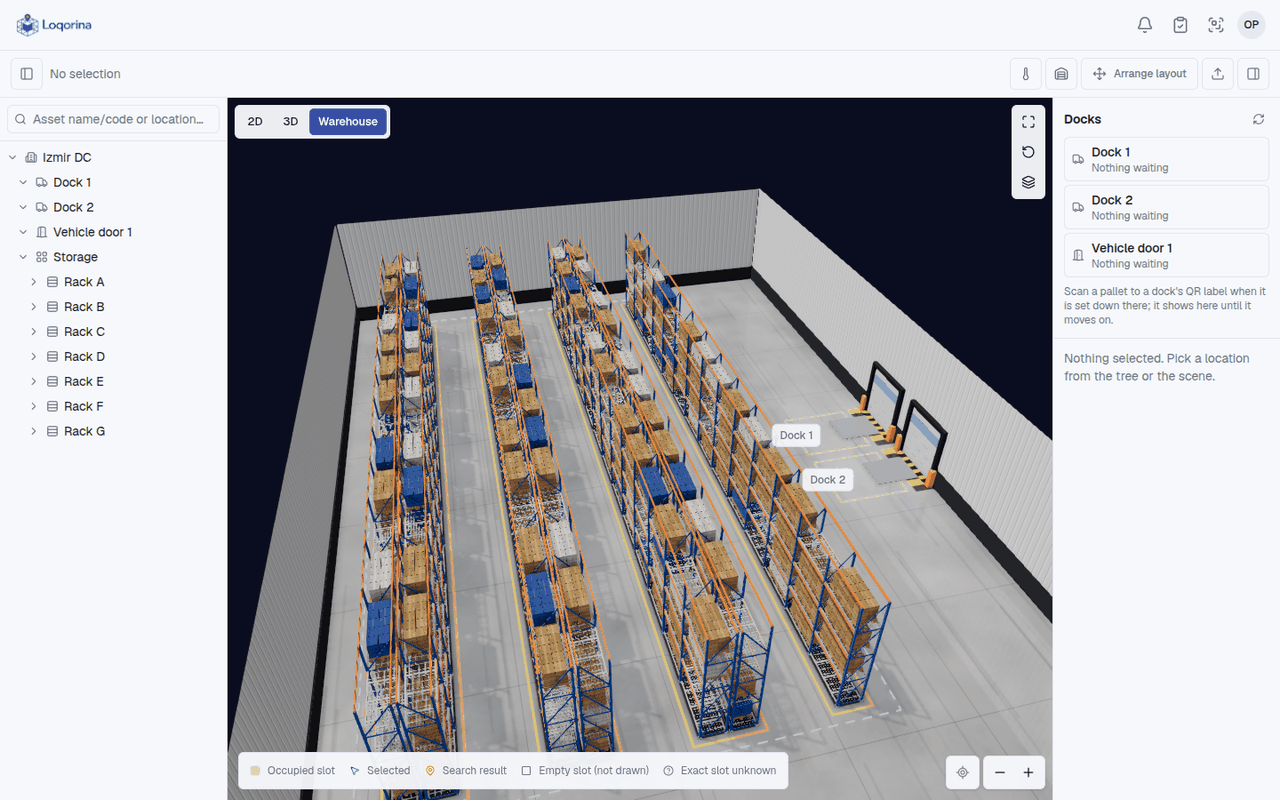
The Warehouse view shows the site you set up as a building: walls, dock and vehicle doors, rack frames, floor markings and lights. It is drawn from your layout each time it opens, so a rack or door you move in the layout editor moves here too. Nothing is modelled or uploaded.
Open it
Above the 3D scene, choose Warehouse next to 2D and 3D. This browser remembers the choice.
What it shows
An occupied slot carries cartons on a pallet; an empty slot stays empty. The cartons stand for an occupied slot. They are not a product, a quantity or a size.
Search, selection and labels work as in 3D. A search result is highlighted and the other cartons are dimmed.
Moving around
View controls has two shortcuts. Walk down an aisle puts the camera at eye level at the end of the longest aisle. See the whole warehouse goes back to the overview. A wall in front of the racks steps aside, and the roof goes when you look from above.
When the plain 3D view is used
The heatmap and the level filter show in the plain 3D view; turn them off to come back. 2D, arranging the layout and measuring use the plain views too. On a device that can't draw the Warehouse view smoothly, the plain 3D view takes over and says so.
Sample forklift movement
For demos, View controls has Sample forklift movement. Forklifts drive empty through the aisles under a Simulation label. They are not real data and never change stock. It is off by default and off again after a reload.