
QR Warehouse Counts and Missing Asset Checks
Select a location, scan the assets present and compare them with records. Separate missing assets, assets recorded elsewhere and confirmed matches.
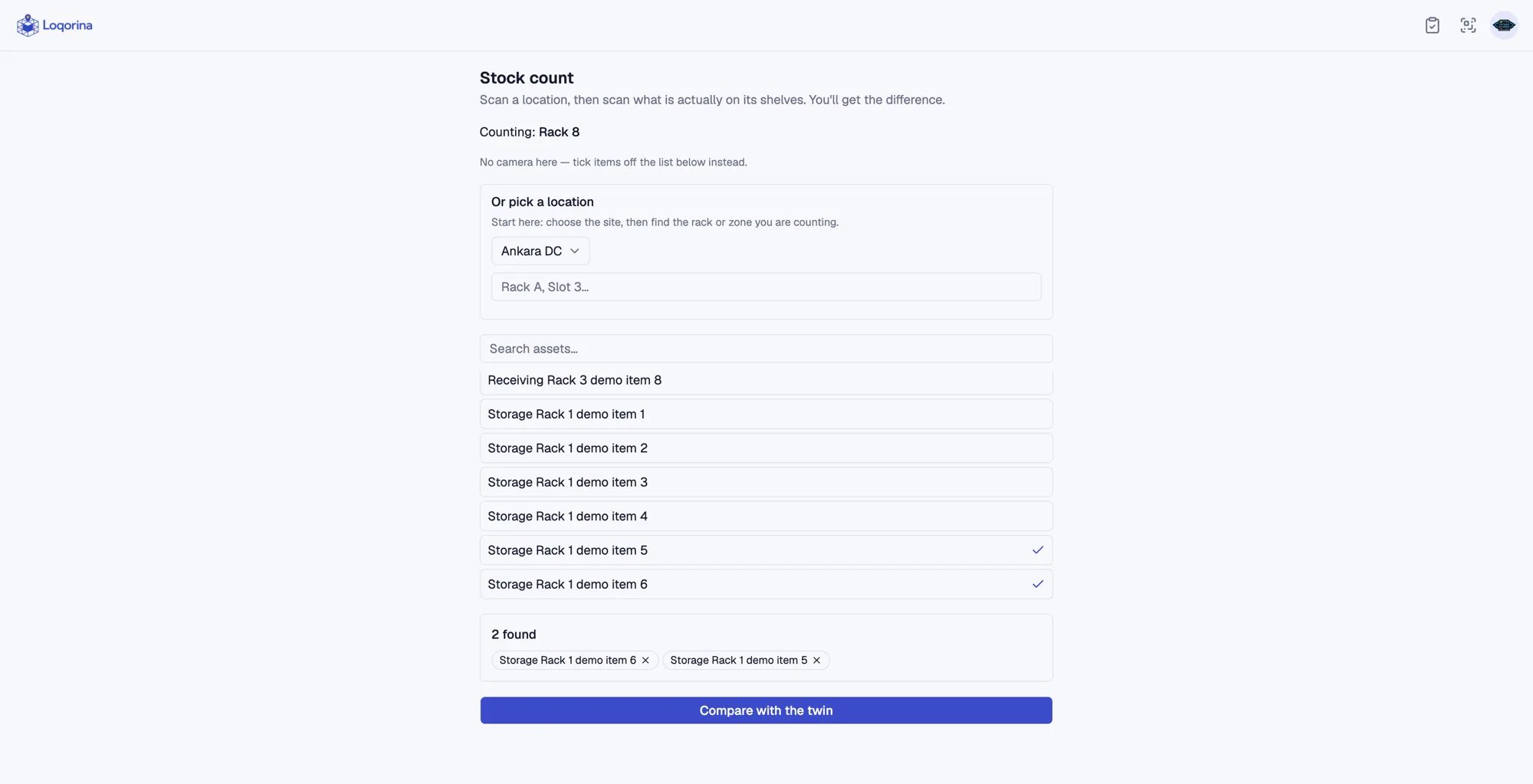
A shelf being occupied in the system does not prove that the expected asset is there. A Loqorina count compares the physical assets at a selected location with recorded positions. It makes discrepancies visible before a person decides whether and how to correct them.
Choose the location to count
Scan a location code or select the location by name on the count screen. Then record the assets you find on the shelf by scanning their code, typing it or searching by name. The location sets where you are counting; the assets you record are what you actually found.
Review three separate results
Missing assets are recorded here but were not scanned. Assets recorded elsewhere were found here despite a different recorded position. Confirmed assets match the expected location, letting the team distinguish different kinds of discrepancies.
Check the discrepancy before correcting it
A count never moves an asset automatically. Review the result, then correct a location with a separate scan, an explicit move or an approved count review. The correction is then recorded in movement history instead of happening silently.
Scope and limitations
This flow checks the locations of individually identified assets. Do not treat it as financial stock valuation, product-quantity reconciliation or automatic inventory adjustment.